
React 模式接入
@rootauth/react 为 React 18+ 提供 RootAuth hosted 完整认证页面,包括登录、注册、重置密码、MFA 和第三方登录。hosted 运行时和样式会按需加载,无需手动导入 CSS。
前置条件
在 RootAuth 工作台 创建应用,并复制 app_id(格式如 app_******)。
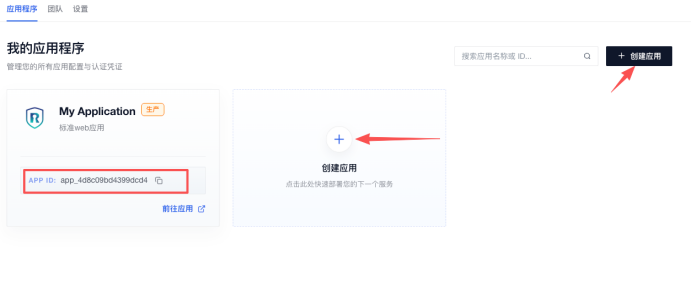
请在项目根目录的 .npmrc 文件中添加下面这行配置:
@rootauth:registry=http://gitlab.standard-software.co/api/v4/projects/12421/packages/npm/1. 安装
@rootauth/react 将完整 RootAuth 认证页面封装为 React SDK,并依赖 React 18。
npm install @rootauth/react react react-dom2. 初始化
RootAuthClient 接收 API、应用、OIDC、Hosted 路径和成功回调配置。客户端可传给 React 组件,也可通过命令式 API 挂载。
import { RootAuthClient } from '@rootauth/react'

export const rootAuth = new RootAuthClient({
  app_id: 'your-app-id',
  api_base_url: 'https://rootauth-api.rootauth.com',
  redirect_uri: window.location.origin,
  scope: ['openid'],
  base_path: '/auth',
})
3. 配置参数
配置对象统一控制应用标识、API 地址、回调地址、认证路径、语言和登录注册成功行为。
| 参数 | 类型 | 默认值 | 说明 |
|---|---|---|---|
app_id |
string |
无 | 必填,RootAuth 应用 ID |
api_base_url |
string |
https://rootauth-api.rootauth.com |
API 地址 |
redirect_uri |
string |
window.location.origin |
登录或注册成功回调地址 |
scope |
string[] |
['openid'] |
OIDC scope |
state |
string |
undefined |
OIDC state |
grant_type |
string |
authorization_code |
授权模式 |
locale |
string |
zh-CN |
初始语言 |
base_path |
string |
/ |
hosted 路由前缀 |
logo_url |
string |
后端应用配置 | 自定义 logo 地址 |
onLoginSuccess |
(data) => void | false |
undefined |
登录成功回调;返回 false 阻止默认跳转 |
onRegisterSuccess |
(data) => void | false |
undefined |
注册成功回调;返回 false 阻止默认跳转 |
enable_google_one_tap |
boolean |
false |
启用 Google One Tap |
show_submit_loading |
boolean |
true |
hosted 提交按钮显示 loading |
4. 使用 RootAuthMount
RootAuthMount 在 React 生命周期内创建 Hosted 应用,并在组件卸载时自动清理。组件接收已初始化的 RootAuth 客户端。
import { RootAuthMount } from '@rootauth/react'
import { rootAuth } from './rootauth'

export function AuthPage() {
  return (
    <RootAuthMount
      client={rootAuth}
      containerId="rootauth-sdk"
      className="auth-page"
      style={{ minHeight: '100vh' }}
    />
  )
}
RootAuthMount 参数:
| 参数 | 类型 | 默认值 | 说明 |
|---|---|---|---|
client |
RootAuthClient |
无 | 必填,客户端实例 |
containerId |
string |
rootauth-sdk |
容器 ID |
className |
string |
undefined |
容器 class |
style |
CSSProperties |
undefined |
容器内联样式 |
组件会在 React 生命周期内自动创建和清理 Hosted 页面。
5. 路由
React Router 可通过通配路径承载 RootAuthMount,由 RootAuth 客户端根据 base_path 管理内部登录、注册和重置密码页面。
React 路由由宿主应用管理,在对应路由页面渲染 RootAuthMount 即可。需要共享的 hosted 路径列表时可调用:
import { getAuthRoutePaths } from '@rootauth/react'

const paths = getAuthRoutePaths('/auth')
getAuthRoutePaths('/auth') 返回 /auth、/auth/login、/auth/register、/auth/reset-password。宿主路由通常使用 /auth/* 承载 RootAuthMount。
登录和注册方式不通过客户端 type 配置,而由 RootAuth 后台应用开关决定。页面会按后台配置展示邮箱密码、邮箱验证码、手机号密码、手机号验证码或用户名密码方式。
6. 回调示例
onLoginSuccess 和 onRegisterSuccess 可接收成功结果并覆盖默认跳转。回调返回 false 时,SDK 不再执行后续默认导航。
const rootAuth = new RootAuthClient({
  app_id: 'your-app-id',
  onLoginSuccess(data) {
    console.log('登录成功', data)
    return false
  },
  onRegisterSuccess(data) {
    console.log('注册成功', data)
  },
})
7. Core 能力
React 客户端继承 Core API,可直接调用 login()、sendCode()、register()、resetPassword()、verifyLoginMfa()、logout() 和第三方登录方法。包同时重新导出 @rootauth/core 的类型及辅助函数。
9. 相关模式
@rootauth/core:无 UI API@rootauth/web-components:框架无关表单组件@rootauth/vue:Vue 3 hosted 完整页面
;}.cls-2{fill:%230868f7;}.cls-3{fill:url(%23未命名的渐变_44);}.cls-4{fill:%23333;}%3c/style%3e%3clinearGradient%20id='未命名的渐变_8'%20x1='33.73'%20y1='100.61'%20x2='-0.03'%20y2='-1.06'%20gradientUnits='userSpaceOnUse'%3e%3cstop%20offset='0'%20stop-color='%237ae9fb'/%3e%3cstop%20offset='0.67'%20stop-color='%232b90f8'/%3e%3cstop%20offset='1'%20stop-color='%230868f7'/%3e%3c/linearGradient%3e%3clinearGradient%20id='未命名的渐变_44'%20x1='27.86'%20y1='18.67'%20x2='68.36'%20y2='22.22'%20gradientUnits='userSpaceOnUse'%3e%3cstop%20offset='0'%20stop-color='%235ac7f2'/%3e%3cstop%20offset='1'%20stop-color='%230868f7'/%3e%3c/linearGradient%3e%3c/defs%3e%3cpath%20class='cls-1'%20d='M29,28.74V81.91l-9.51-3.68v0L8.52,74A7.17,7.17,0,0,1,4,67.32V24.54A3.76,3.76,0,0,1,9.08,21Z'/%3e%3cpath%20class='cls-2'%20d='M68.09,78.07a13.15,13.15,0,0,1-17.9,12.06L29,81.91h0V28.74L50.19,37A13.17,13.17,0,0,0,68.08,25.3h0Z'/%3e%3cpath%20class='cls-3'%20d='M68.08,25.3a13.19,13.19,0,0,1-6.73,10.87A13.09,13.09,0,0,1,50.19,37L29,28.74V6A3.76,3.76,0,0,1,34.1,2.52l25.59,9.91A13.22,13.22,0,0,1,68.08,25.3Z'/%3e%3cpath%20class='cls-4'%20d='M129.06,81.76a4.33,4.33,0,0,1-3.19-1.31,4.4,4.4,0,0,1-1.31-3.24V56.86H97.65V77.21a4.36,4.36,0,0,1-1.35,3.2A4.68,4.68,0,0,1,93,81.76a4.32,4.32,0,0,1-3.19-1.31,4.37,4.37,0,0,1-1.32-3.24V27.27A4.58,4.58,0,0,1,89.83,24a4.59,4.59,0,0,1,7.82,3.27V48.15h26.91V27.27A4.58,4.58,0,0,1,125.91,24a4.59,4.59,0,0,1,7.82,3.27V77.21a4.37,4.37,0,0,1-1.36,3.2A4.65,4.65,0,0,1,129.06,81.76Z'/%3e%3cpath%20class='cls-4'%20d='M163.77,81.66c-6.57,0-11.76-1.92-15.44-5.7s-5.54-9.07-5.54-15.74a26.76,26.76,0,0,1,2.09-10.43,17.72,17.72,0,0,1,6.67-8.06,19.15,19.15,0,0,1,10.68-2.95,19,19,0,0,1,10.46,2.8,18.7,18.7,0,0,1,6.55,7.36,22.53,22.53,0,0,1,2.36,10.28A4.51,4.51,0,0,1,177,63.77H152.23a10.8,10.8,0,0,0,3.49,6.65c2,1.68,4.88,2.52,8.66,2.52a22.25,22.25,0,0,0,7.54-1.21c.74-.3,1.55-.67,2.37-1.07a3.75,3.75,0,0,1,1.84-.4,4.09,4.09,0,0,1,3,1.15,4,4,0,0,1,1.12,3,4.38,4.38,0,0,1-2.58,3.82,32.34,32.34,0,0,1-6.36,2.61A28.67,28.67,0,0,1,163.77,81.66ZM172.4,55.9a9.72,9.72,0,0,0-1.63-4.56A9.9,9.9,0,0,0,167,48a10.38,10.38,0,0,0-4.64-1.14,12,12,0,0,0-4.77,1.06,9.54,9.54,0,0,0-4.89,5.66,11.78,11.78,0,0,0-.51,2.3Z'/%3e%3cpath%20class='cls-4'%20d='M193,81.64a4.49,4.49,0,0,1-4.51-4.55V27.28A4.58,4.58,0,0,1,189.84,24a4.48,4.48,0,0,1,3.28-1.36A4.36,4.36,0,0,1,196.35,24a4.46,4.46,0,0,1,1.31,3.31V77.09a4.34,4.34,0,0,1-1.35,3.2A4.67,4.67,0,0,1,193,81.64Z'/%3e%3cpath%20class='cls-4'%20d='M263.79,81.71a5.7,5.7,0,0,1-4.2-1.74,5.76,5.76,0,0,1-1.73-4.19V27.37a4.58,4.58,0,0,1,1.35-3.27A4.59,4.59,0,0,1,267,27.37V72.53h24a4.58,4.58,0,0,1,3.27,7.82A4.66,4.66,0,0,1,291,81.71Z'/%3e%3cpath%20class='cls-4'%20d='M424.48,81.74a4.71,4.71,0,0,1-2.71-.88,5.43,5.43,0,0,1-1-1l-.07-.09-12.41-17-5.41,5v9.44a4.31,4.31,0,0,1-1.36,3.19,4.66,4.66,0,0,1-3.3,1.36A4.29,4.29,0,0,1,395,80.42a4.36,4.36,0,0,1-1.32-3.23V27.37A4.58,4.58,0,0,1,395,24.1a4.52,4.52,0,0,1,6.58.12,4.54,4.54,0,0,1,1.24,3.15V56.31l17.72-16.38.05,0a4.8,4.8,0,0,1,2.94-1.11,4.4,4.4,0,0,1,3.27,1.2,4.57,4.57,0,0,1,1.2,3.27,4.44,4.44,0,0,1-.77,2.33,7.45,7.45,0,0,1-1.43,1.65l-11,9.64,13.34,17.68a5,5,0,0,1,1,2.71,4.12,4.12,0,0,1-1.36,3.24A4.64,4.64,0,0,1,424.48,81.74Z'/%3e%3cpath%20class='cls-4'%20d='M317.93,81.76a21.5,21.5,0,1,1,21.17-21.5A21.37,21.37,0,0,1,317.93,81.76Zm0-34.1a12.61,12.61,0,1,0,12.42,12.6A12.52,12.52,0,0,0,317.93,47.66Z'/%3e%3cpath%20class='cls-4'%20d='M212.18,101.22a4.12,4.12,0,0,1-3.05-1.26,4.17,4.17,0,0,1-1.26-3.1V43.34a4.37,4.37,0,0,1,1.3-3.14,4.26,4.26,0,0,1,3.13-1.3,4.19,4.19,0,0,1,3.1,1.26,4.32,4.32,0,0,1,1.26,3.16,20.77,20.77,0,0,1,13-4.54,21.51,21.51,0,0,1,0,43,20.51,20.51,0,0,1-13-4.57V96.86a4.15,4.15,0,0,1-1.3,3.06A4.5,4.5,0,0,1,212.18,101.22Zm17.43-53.63c-6.23,0-12.93,4.11-12.93,12.72a12.73,12.73,0,0,0,25.46,0A12.71,12.71,0,0,0,229.61,47.59Z'/%3e%3cpath%20class='cls-4'%20d='M365.76,81.76a21.5,21.5,0,1,1,21.18-21.5A21.37,21.37,0,0,1,365.76,81.76Zm0-34.1a12.61,12.61,0,1,0,12.42,12.6A12.52,12.52,0,0,0,365.76,47.66Z'/%3e%3c/svg%3e)