
Web components 模式接入
@rootauth/web-components 提供与框架无关的 RootAuth 自定义元素,支持登录、注册、重置密码和 MFA 二次认证。
前置条件
在 RootAuth 工作台 创建应用,并复制 app_id(格式如 app_******)。
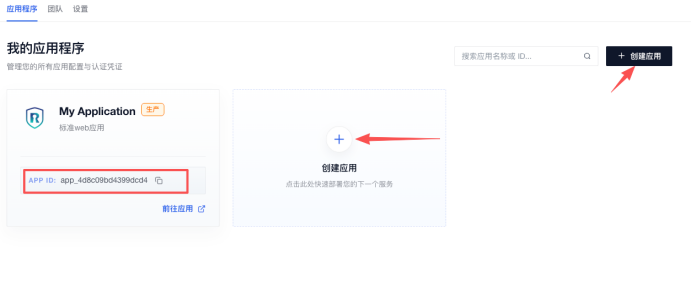
请在项目根目录的 .npmrc 文件中添加下面这行配置:
@rootauth:registry=http://gitlab.standard-software.co/api/v4/projects/12421/packages/npm/1. 安装
pnpm add @rootauth/web-components也可以使用 npm:
npm install @rootauth/web-components2. 初始化
初始化函数会注册四类 RootAuth 自定义元素,并接收所有元素共用的全局 config。
import { defineRootAuthWebComponents } from '@rootauth/web-components'

defineRootAuthWebComponents({
  config: {
    app_id: 'your-app-id',
    api_base_url: 'https://rootauth-api.rootauth.com',
    redirect_uri: window.location.origin,
    scope: ['openid'],
    locale: 'zh-CN',
  },
})
config 是必填的全局参数,在初始化时统一传入,登录、注册、重置密码和 MFA 组件共用该配置。注册函数是幂等的,重复调用不会重复注册同名元素。
默认注册以下元素:
| 元素 | 用途 |
|---|---|
<rootauth-login> |
登录 |
<rootauth-register> |
注册 |
<rootauth-reset-password> |
重置密码 |
<rootauth-mfa> |
登录后的 MFA 二次认证 |
3. 最小示例
<rootauth-login type="email-password"></rootauth-login>const login = document.querySelector('rootauth-login')!
login.addEventListener('success', event => {
console.log('登录成功', event.detail.data, event.detail.values)
})
login.addEventListener('error', event => {
console.error(event.detail.message, event.detail.error)
})config.app_id 是必填项。未传 config.api_base_url 时使用 https://rootauth-api.rootauth.com。
4. 组件参数
组件在 HTML 中使用标签挂载。
4.1 参数
| 参数 | 类型 | 默认值 | 说明 |
|---|---|---|---|
type |
元素对应的枚举值 | 各组件默认类型 | 选择登录、注册、重置密码或 MFA 页面类型 |
submit-text |
string |
当前语言默认文案 | 覆盖提交按钮文字 |
size |
large | default | small |
default |
同时作为输入控件和按钮的默认尺寸 |
input-size |
large | default | small |
使用 size |
只覆盖输入控件尺寸 |
button-size |
large | default | small |
使用 size |
只覆盖按钮尺寸 |
required-marks |
boolean |
false |
显示全部字段必填星号;只影响显示 |
show-remember-password |
boolean |
false |
仅登录组件使用,显示“记住密码” |
<rootauth-login
  type="email-code"
  size="large"
  input-size="default"
  button-size="large"
  required-marks
  submit-text="Continue"
></rootauth-login><rootauth-login
type="email-code"
submit-text="继续"
size="large"
input-size="default"
button-size="large"
required-marks
show-remember-password
></rootauth-login>FieldKey 可取:email、username、phone、password、newPassword、confirmPassword、code、mfaEmail、mfaPhone、mfaCode、mfaSecondaryCode。
对象和函数参数 fieldLabels、requiredMarks、fieldIcons、fieldPlaceholders、beforeSubmit 通过元素 property 设置,不作为 HTML 标签属性。
无效的 type、size 或 MFA type 会回退到该元素的默认值。无效的全局 config.locale 会回退到 zh-CN。
4.2 自定义字段外观
字段外观通过 fieldIcons 和 fieldPlaceholders 统一配置。fieldIcons 可整体关闭图标,也可通过字段映射控制部分图标;fieldPlaceholders 覆盖输入框以及区号搜索框的 placeholder。
fieldIcons 设为 true 时显示当前内置默认图标,设为 false 时当前元素的所有字段前置图标都不显示。传入对象时,键使用 FieldKey:字段值为 true 时使用默认图标,false 时隐藏该字段图标,图片 URL 则替换该字段图标;未配置字段继续使用内置图标。图片 URL 可以是站内地址、完整 URL、Data URL 或 SVG Data URL。组件将 URL 放入 <img>,不执行任意 HTML。
fieldPlaceholders 支持全部 FieldKey,并额外支持 phoneCodeSearch,用于手机号区号下拉框中的搜索输入框。
<rootauth-login id="styled-login" type="email-password"></rootauth-login>

<script type="module">
  const login = document.querySelector('#styled-login')
  login.fieldIcons = { email: false, password: '/assets/password-icon.svg' }
  login.fieldPlaceholders = { email: '请输入工作邮箱', password: '请输入账户密码' }
</script>
4.3 CSS Shadow Parts
组件为稳定的内部结构声明了标准 part,用户侧可以通过 组件选择器::part(name) 覆盖 Shadow DOM 内的样式,不需要依赖内部 .rootauth-wc-* class。
| Part | 对应内容 |
|---|---|
form |
表单根节点 |
field |
单个字段容器 |
label、required-mark |
字段 label 和必填标记 |
control、control-error、control-disabled |
输入控件及错误、禁用状态 |
input、icon、input-action |
输入框、前置图标和清除/密码可见操作 |
error |
字段错误文案 |
phone-code-trigger |
手机区号下拉触发按钮 |
phone-code-dropdown、phone-code-search、phone-code-option |
区号下拉层、搜索框和选项 |
code-row、code-button |
验证码输入行和发送按钮 |
submit-button、submit-loading |
提交按钮及 loading 状态 |
remember-password、remember-password-checkbox |
记住密码区域和复选框 |
agreement、agreement-error |
注册协议及未确认错误状态 |
totp-container、totp-qrcode、totp-secret |
TOTP 设置区域、二维码和手动密钥 |
rootauth-login::part(control) {
  border-radius: 8px;
  background: #fff;
}

rootauth-login::part(input) {
  font-family: Inter, sans-serif;
}

rootauth-login::part(submit-button) {
  border: 0;
  border-radius: 8px;
  background: #111827;
  font-weight: 600;
}

rootauth-login::part(control-error) {
  box-shadow: 0 0 0 1px #dc2626 inset;
}
::part() 不支持继续选择 part 内部的后代元素,例如 ::part(control) input 无效;请直接使用 ::part(input)。全局提示消息位于 document light DOM,可通过 .rootauth-wc-global-message-host .rootauth-wc-message 使用普通 CSS 修改。
5. config 参数
config 是 defineRootAuthWebComponents({ config }) 的必填全局初始化参数,类型为 RootAuthElementConfig,并继承 RootAuthClientConfig。初始化后,所有 RootAuth 元素统一使用这份配置,不需要也不应逐个给元素设置 config。完整参数如下:
| 参数 | 类型 | 默认值 | Web Components 中的作用 |
|---|---|---|---|
app_id |
string |
无 | 必填 |
api_base_url |
string |
https://rootauth-api.rootauth.com |
RootAuth API 地址 |
redirect_uri |
string |
window.location.origin |
登录、注册请求的回调地址 |
scope |
string[] |
['openid'] |
OIDC scope |
state |
string |
无 | OIDC state |
grant_type |
string |
authorization_code |
登录、注册请求的授权模式 |
locale |
string |
zh-CN | 多语言设置 |
message |
RootAuthMessageConfig |
{} |
配置全局提示消息 |
show_submit_loading |
boolean |
false |
是否在提交按钮中显示 loading 图标 |
defineRootAuthWebComponents({
  config: {
    app_id: 'your-app-id',
    api_base_url: 'https://api.example',
    locale: 'zh-CN',
    message: { duration: 5000 },
    show_submit_loading: true,
  },
})
5.1 message
interface RootAuthMessageConfig {
  colors?: Partial<Record<'primary' | 'success' | 'warning' | 'info' | 'error', string>>
  duration?: number
  show_error?: boolean
}| 参数 | 类型 | 默认值 | 说明 |
|---|---|---|---|
colors |
Partial<Record<MessageType, string>> |
内置颜色 | 覆盖提示消息颜色 |
duration |
number |
5000 |
消息自动关闭毫秒数;<= 0 时不自动关闭,但仍可手动关闭 |
show_error |
boolean |
true |
是否显示默认错误提示;关闭后仍会派发 error |
defineRootAuthWebComponents({
  config: { message: { colors: { error: '#f00' }, duration: 3000, show_error: true } },
})
MessageType 为 primary、success、warning、info、error。
6. 登录组件
<rootauth-login> 根据 type 渲染邮箱、手机号或用户名登录表单,并自动处理验证码、密码加密、字段校验和 MFA 事件。
元素:<rootauth-login>,对应类:RootAuthLoginElement。
6.1 type
| 值 | 登录方式 | 字段 | API type |
|---|---|---|---|
email-password |
邮箱 + 密码登录 | email、password |
EMAIL_PASS |
phone-password |
手机号 + 密码登录 | phoneCode、phoneNum、password |
PHONE_PASS |
username-password |
用户名 + 密码登录 | username、password |
USER_NAME_PASS |
email-code |
邮箱 + 验证码登录 | email、code |
EMAIL_CODE |
phone-code |
手机号 + 验证码登录 | phoneCode、phoneNum、code |
PHONE_CODE |
默认值为 email-password。验证码登录点击“获取验证码”后会触发 code-sent;手机号区号来自【工作台-登陆控制-手机区号策略】。
<rootauth-login type="email-password" submit-text="登录" show-remember-password></rootauth-login>6.2 记住密码
showRememberPassword 控制密码登录表单是否显示“记住密码”复选框,默认值为 false。该属性只对 email-password、phone-password 和 username-password 生效,验证码登录不会显示。
<rootauth-login type="email-password" show-remember-password></rootauth-login>用户勾选后,组件在登录接口成功返回时将当前登录类型、账号和原始密码加密保存到 localStorage;下次挂载相同登录类型时自动回填并保持勾选。用户取消勾选并成功登录后,组件清除已保存记录。登录返回 MFA 要求时,首因子已经验证成功,因此也会执行保存。
7. 注册组件
<rootauth-register> 根据 type 渲染邮箱、手机号或用户名注册表单。组件根据后端配置处理密码规则、验证码和用户协议。
元素:<rootauth-register>,对应类:RootAuthRegisterElement。
7.1 type
| 值 | 注册方式 | 字段 | API type |
|---|---|---|---|
email-code-password |
邮箱验证码 + 密码注册 | email、code、password |
EMAIL_CODE_PASS |
phone-code-password |
手机验证码 + 密码注册 | phoneCode、phoneNum、code、password |
PHONE_CODE_PASS |
username-password |
用户名 + 密码注册 | username、password |
USER_NAME_PASS |
默认值为 email-code-password。
<rootauth-register type="email-code-password" submit-text="注册"></rootauth-register>注册协议是否显示、协议内容以及是否要求用户勾选,取决于【工作台-全局登录-功能配置】中是否开启控制。组件不提供前端隐藏协议的参数;用户未勾选会阻止提交。
8. 重置密码组件
<rootauth-reset-password> 支持邮箱或手机号验证码找回密码,并在请求前校验和加密新密码。
元素:<rootauth-reset-password>,对应类:RootAuthResetPasswordElement。
8.1 type
| 值 | 重置方式 | 字段 | API type |
|---|---|---|---|
email |
邮箱验证码重置 | email、code、password、password_confirmation |
EMAIL_CODE |
phone |
手机验证码重置 | phoneCode、phoneNum、code、password、password_confirmation |
PHONE_CODE |
默认值为 email。新密码和确认密码都会在请求前使用应用配置中的 RSA 公钥加密,并执行密码一致性校验。
<rootauth-reset-password type="email" submit-text="重置密码"></rootauth-reset-password>9. MFA 组件
<rootauth-mfa> 处理邮箱、手机号和 TOTP 验证,也支持首次绑定验证器,该组件接收登录接口返回的 MFA 数据。
元素:<rootauth-mfa>,对应类:RootAuthMfaElement。
9.1 参数
| 参数 | 类型 | 默认值 | 说明 |
|---|---|---|---|
type |
otp | phone | email |
otp |
MFA 页面类型 |
mfaType |
MfaMethod | undefined |
按 type 推断 |
精确指定 API mfa_type |
mfaToken |
string |
'' |
登录接口返回的 mfa_token;提交必需 |
email |
string |
'' |
邮箱;传入后邮箱输入框只读 |
phoneCode |
string |
'' |
手机号区号 |
phoneNum |
string |
'' |
手机号;传入后手机号输入框只读 |
phoneMask |
string |
'' |
展示脱敏手机号;传入后手机号输入框只读 |
phoneAllowCodes |
string[] |
['86'] |
可选手机号区号 |
totpSecret |
string |
'' |
TOTP 密钥或完整 otpauth:// URI;有值时生成二维码 |
totpBindNeedVerifyCode |
boolean |
false |
是否要求 TOTP 绑定前验证邮箱或手机号 |
mfaTotpText |
MfaTotpTextConfig |
{} |
TOTP 设置流程文案 |
totpSetupHint |
string |
'' |
二维码设置提示 |
totpManualEntryHint |
string |
'' |
手动输入密钥提示 |
totpScanProblemText |
string |
'' |
“无法扫码”操作文案 |
totpScanQrCodeText |
string |
'' |
“显示二维码”操作文案 |
mfaCodePlaceholder |
string |
'' |
MFA 验证码输入框 placeholder |
<rootauth-mfa
  type="otp"
  mfa-type="TOTP_BIND"
  mfa-token="mfa_token_value"
  email="user@example.com"
  phone-code="86"
  phone-num="13800138000"
  phone-mask="138****8000"
  phone-allow-codes="86,852"
  totp-secret="JBSWY3DPEHPK3PXP"
  totp-bind-need-verify-code
  totp-setup-hint="扫描二维码"
  totp-manual-entry-hint="手动输入密钥"
  totp-scan-problem-text="无法扫码"
  totp-scan-qr-code-text="显示二维码"
  mfa-code-placeholder="请输入验证码"
></rootauth-mfa><rootauth-mfa
type="otp"
mfa-totp-text='{"setup_hint":"请使用验证器扫描二维码","manual_entry_hint":"无法扫码时,请手动输入密钥","scan_problem":"无法扫描二维码","scan_qr_code":"返回二维码"}'
></rootauth-mfa>9.2 mfaType 完整列表
mfaType |
验证方式 | code 内容 |
额外参数 |
|---|---|---|---|
EMAIL |
已绑定邮箱验证 | 邮箱验证码 | email 可由登录响应传入 |
EMAIL_BIND |
绑定邮箱并验证 | 邮箱验证码 | email |
PHONE_CODE |
已绑定手机号验证 | 短信验证码 | phoneCode、phoneNum 或 phoneMask |
PHONE_CODE_BIND |
绑定手机号并验证 | 短信验证码 | phoneCode、phoneNum |
TOTP |
已绑定验证器验证 | 验证器动态码 | 无 |
TOTP_BIND |
首次绑定验证器 | 验证器动态码 | totpSecret;选择验证码时还需要绑定验证码 |
<rootauth-mfa type="otp" mfa-type="TOTP_BIND"></rootauth-mfa>mfaType 未传时的推断规则:type="phone" -> PHONE_CODE,type="email" -> EMAIL,type="otp" -> TOTP。
当 type="otp" 且 totpBindNeedVerifyCode=true 时,组件根据已绑定项显示邮箱或手机号验证码;仅绑定一项时直接使用该项,同时绑定两项时按登录方式选择初始渠道。该值为 false 时不显示也不提交 totp_bind_code。
loginAccountType 和 totpAccountName 由登录组件根据登录方式自动生成,并通过 mfa_token 传递给 MFA 组件,业务方无需设置。
从登录接口获取 MFA 数据后,可以这样挂载:
<rootauth-mfa
  type="email"
  mfa-token="mfa_token_value"
  email="user@example.com"
></rootauth-mfa>
TOTP 绑定示例:
<rootauth-mfa type="otp" mfa-token="mfa_token_value"></rootauth-mfa>仅当 type="otp"、totpBindNeedVerifyCode=true,且登录 MFA 响应同时返回 email 和手机号(phone_num 或 phone_num_mask)时,OTP 绑定验证账号行才显示切换按钮。只绑定一项时直接使用该项,不显示切换按钮;切换到独立 email 或 phone MFA 页面后也不显示该按钮。
登录响应中的 MFA 参数可以直接映射到标签属性:
<rootauth-mfa
  type="otp"
  mfa-type="TOTP_BIND"
  mfa-token="mfa_token_value"
  email="user@example.com"
  phone-code="86"
  phone-num="13800138000"
  phone-mask="138****8000"
  totp-secret="JBSWY3DPEHPK3PXP"
  totp-bind-need-verify-code
></rootauth-mfa>
10. 公开方法
公开方法允许业务方在不操作 Shadow DOM 的情况下写入表单状态。当前提供 setValues(),可用于回填账号、区号或其他字段。
10.1 setValues(values)
setValues(values: Record<string, string | number | boolean | null | undefined>): void批量设置字段值并重新渲染。null 和 undefined 会被忽略,其他值会转换为字符串,并触发一次 value-change。
login.setValues({
  email: 'user@example.com',
  password: 'Password1',
})
常用字段名:
| 元素 | 字段名 |
|---|---|
| 登录 | email、phoneCode、phoneNum、username、password、code |
| 注册 | email、phoneCode、phoneNum、username、password、code |
| 重置密码 | email、phoneCode、phoneNum、password、password_confirmation、code |
| MFA | email、phoneCode、phoneNum、code、bindCode |
11. 事件
组件通过 DOM CustomEvent 向外部传递成功、错误、验证码发送、字段变化、MFA 要求和密钥复制状态。
所有自定义事件都设置了 bubbles: true 和 composed: true,可以在组件本身或祖先节点监听。
11.1 success
登录、注册、重置密码或 MFA 成功时触发。
interface RootAuthSuccessDetail {
  source: 'login' | 'register' | 'reset-password' | 'mfa'
  data?:
    | CustomerLoginResponse
    | RegisterWithCaptchaResponse
    | LoginSuccessData
    | Record<string, never>
  values: Record<string, string>
}
11.2 error
请求失败、验证码失败或配置错误时触发。
interface RootAuthErrorDetail {
  source: 'login' | 'register' | 'reset-password' | 'mfa'
  error: unknown
  message: string
}
11.3 code-sent
邮箱、手机或 MFA 验证码发送成功时触发。发送成功后按钮按应用配置 verify_code_resend_interval_seconds 进入倒计时;配置缺失或无效时使用 60 秒。
获取验证码时,如果出现“验证码错误次数过多,请重新获取”的错误提示,请到【工作台-通用安全-验证码规则-验证码尝试次数】查看次数是否符合需求。
interface RootAuthCodeSentDetail {
  source: 'login' | 'register' | 'reset-password' | 'mfa'
  target: 'email' | 'phone'
  values: Record<string, string>
}
11.4 value-change
字段输入、清空、手机号区号选择或 setValues 后触发。
interface RootAuthValueChangeDetail {
  source: 'login' | 'register' | 'reset-password' | 'mfa'
  values: Record<string, string>
}
11.5 mfa-required
登录成功但后端要求 MFA 时由登录组件触发。此时不会触发 success。
interface RootAuthMfaRequiredDetail {
  data: CustomerLoginResponse
  loginAccountType: 'EMAIL' | 'PHONE' | 'USERNAME'
  values: Record<string, string>
}
data 通常包含 mfa_token、mfa_methods、email、email_mask、phone_code、phone_num、phone_num_mask 和 totp_secret。loginAccountType 是登录组件根据当前 type 明确给出的登录账号类型。
11.6 totp-secret-copied
用户在 TOTP 手动输入模式点击复制密钥并复制成功后触发。
interface RootAuthTotpSecretCopiedDetail {
  source: 'mfa'
  secret: string
}
12. 插槽
插槽允许在账号输入区和提交按钮前后加入业务内容,同时保留组件自身的布局和请求逻辑。
使用时将业务元素写在 RootAuth 标签内部,并通过 slot="插槽名" 指定位置;无需访问 Shadow DOM,也无需使用 JavaScript 创建节点。
当前支持以下命名插槽:
| slot | 出现位置 | 适用元素 |
|---|---|---|
before-submit |
提交按钮之前 | 登录、注册 |
after-submit |
提交按钮之后 | 登录、注册、重置密码 |
account-suffix |
账号控件右侧 | 验证码登录、重置密码、TOTP 邮箱/手机号验证 |
before-submit适合放置忘记密码、辅助操作等内容。after-submit适合放置协议、注册入口或流程说明。account-suffix与账号输入框位于同一行;组件自身需要显示 MFA 验证方式切换时,会优先使用内置切换按钮。
<rootauth-login type="email-code">
  <button slot="account-suffix" type="button">切换账号类型</button>
  <a slot="before-submit" href="/help">无法登录?</a>
</rootauth-login><rootauth-mfa type="otp" totp-bind-need-verify-code>
<button slot="account-suffix" type="button">切换验证方式</button>
</rootauth-mfa>未声明对应命名插槽的组件会忽略该位置;插槽内容的点击、链接跳转和业务状态仍由接入页面自行处理。
13. 请求、校验与跳转行为
组件会读取后端应用配置来决定验证码、密码规则、手机号区号和用户协议,并统一派发成功或错误事件。
- 组件会自动执行腾讯验证码;发送验证码和提交表单都会触发验证码流程。
- 密码在登录、注册和重置密码请求发送前使用 RSA 加密。
- 登录、注册或 MFA 登录成功时,默认在 1 秒后跳转。
success和error都是可取消事件;监听器调用event.preventDefault()可覆盖默认跳转或默认错误提示。- 错误提示直接挂载在
document.body顶部,组件切换或卸载后仍显示到自动关闭;可通过message.show_error: false全局关闭默认错误提示。 - 应用配置中的手机号区号、用户名规则、用户协议、RSA 公钥和验证码开关会参与渲染或校验。
- 组件使用 Shadow DOM,样式已由 Web Components 入口内置;业务方不需要导入
style.css。
14. TypeScript 类型导出
包入口导出初始化配置、组件属性、字段映射、事件详情和各流程枚举类型。
import type {
  RootAuthElementConfig,
  RootAuthFieldIcon,
  RootAuthFieldIcons,
  RootAuthFieldLabels,
  RootAuthFieldPlaceholders,
  RootAuthPlaceholderKey,
  RootAuthLoginType,
  RootAuthLoginElementProps,
  RootAuthRegisterType,
  RootAuthResetPasswordType,
  RootAuthMfaType,
  RootAuthMfaElementProps,
  RootAuthRegisterElementProps,
  RootAuthSuccessDetail,
  RootAuthErrorDetail,
  RootAuthCodeSentDetail,
  RootAuthMfaRequiredDetail,
  RootAuthValueChangeDetail,
} from '@rootauth/web-components'
15. 完整初始化示例
完整示例组合全局 API 配置、组件尺寸、label、图标、placeholder、提交前钩子和组件事件监听,可作为业务接入模板。
<rootauth-login id="rootauth-login" type="email-password"></rootauth-login>
<rootauth-mfa type="otp" mfa-token="mfa_token_value"></rootauth-mfa>import { defineRootAuthWebComponents, type RootAuthElementConfig } from '@rootauth/web-components'
const config: RootAuthElementConfig = {
app_id: 'your-app-id',
api_base_url: 'https://rootauth-api.rootauth.com',
redirect_uri: window.location.origin,
scope: ['openid'],
state: 'your-state',
locale: 'zh-CN',
message: {
duration: 5000,
colors: {
success: '#16a34a',
error: '#dc2626',
},
},
show_submit_loading: false,
}
defineRootAuthWebComponents({ config })
const login = document.querySelector('rootauth-login')!
login.requiredMarks = true
login.showRememberPassword = true
login.fieldLabels = { email: '工作邮箱', password: '账户密码' }
login.fieldIcons = { email: false, password: '/assets/password-icon.svg' }
login.fieldPlaceholders = { email: '请输入工作邮箱' }
login.beforeSubmit = async () => {
// 返回 false 可取消本次提交
return true
}
login.addEventListener('success', event => {
console.log('流程成功', event.detail)
})
login.addEventListener('error', event => {
console.error('流程失败', event.detail.message)
})16. 相关模式
@rootauth/core:无 UI API@rootauth/vue:Vue 3 hosted 完整认证页面@rootauth/react:React 18+ hosted 完整认证页面
;}.cls-2{fill:%230868f7;}.cls-3{fill:url(%23未命名的渐变_44);}.cls-4{fill:%23333;}%3c/style%3e%3clinearGradient%20id='未命名的渐变_8'%20x1='33.73'%20y1='100.61'%20x2='-0.03'%20y2='-1.06'%20gradientUnits='userSpaceOnUse'%3e%3cstop%20offset='0'%20stop-color='%237ae9fb'/%3e%3cstop%20offset='0.67'%20stop-color='%232b90f8'/%3e%3cstop%20offset='1'%20stop-color='%230868f7'/%3e%3c/linearGradient%3e%3clinearGradient%20id='未命名的渐变_44'%20x1='27.86'%20y1='18.67'%20x2='68.36'%20y2='22.22'%20gradientUnits='userSpaceOnUse'%3e%3cstop%20offset='0'%20stop-color='%235ac7f2'/%3e%3cstop%20offset='1'%20stop-color='%230868f7'/%3e%3c/linearGradient%3e%3c/defs%3e%3cpath%20class='cls-1'%20d='M29,28.74V81.91l-9.51-3.68v0L8.52,74A7.17,7.17,0,0,1,4,67.32V24.54A3.76,3.76,0,0,1,9.08,21Z'/%3e%3cpath%20class='cls-2'%20d='M68.09,78.07a13.15,13.15,0,0,1-17.9,12.06L29,81.91h0V28.74L50.19,37A13.17,13.17,0,0,0,68.08,25.3h0Z'/%3e%3cpath%20class='cls-3'%20d='M68.08,25.3a13.19,13.19,0,0,1-6.73,10.87A13.09,13.09,0,0,1,50.19,37L29,28.74V6A3.76,3.76,0,0,1,34.1,2.52l25.59,9.91A13.22,13.22,0,0,1,68.08,25.3Z'/%3e%3cpath%20class='cls-4'%20d='M129.06,81.76a4.33,4.33,0,0,1-3.19-1.31,4.4,4.4,0,0,1-1.31-3.24V56.86H97.65V77.21a4.36,4.36,0,0,1-1.35,3.2A4.68,4.68,0,0,1,93,81.76a4.32,4.32,0,0,1-3.19-1.31,4.37,4.37,0,0,1-1.32-3.24V27.27A4.58,4.58,0,0,1,89.83,24a4.59,4.59,0,0,1,7.82,3.27V48.15h26.91V27.27A4.58,4.58,0,0,1,125.91,24a4.59,4.59,0,0,1,7.82,3.27V77.21a4.37,4.37,0,0,1-1.36,3.2A4.65,4.65,0,0,1,129.06,81.76Z'/%3e%3cpath%20class='cls-4'%20d='M163.77,81.66c-6.57,0-11.76-1.92-15.44-5.7s-5.54-9.07-5.54-15.74a26.76,26.76,0,0,1,2.09-10.43,17.72,17.72,0,0,1,6.67-8.06,19.15,19.15,0,0,1,10.68-2.95,19,19,0,0,1,10.46,2.8,18.7,18.7,0,0,1,6.55,7.36,22.53,22.53,0,0,1,2.36,10.28A4.51,4.51,0,0,1,177,63.77H152.23a10.8,10.8,0,0,0,3.49,6.65c2,1.68,4.88,2.52,8.66,2.52a22.25,22.25,0,0,0,7.54-1.21c.74-.3,1.55-.67,2.37-1.07a3.75,3.75,0,0,1,1.84-.4,4.09,4.09,0,0,1,3,1.15,4,4,0,0,1,1.12,3,4.38,4.38,0,0,1-2.58,3.82,32.34,32.34,0,0,1-6.36,2.61A28.67,28.67,0,0,1,163.77,81.66ZM172.4,55.9a9.72,9.72,0,0,0-1.63-4.56A9.9,9.9,0,0,0,167,48a10.38,10.38,0,0,0-4.64-1.14,12,12,0,0,0-4.77,1.06,9.54,9.54,0,0,0-4.89,5.66,11.78,11.78,0,0,0-.51,2.3Z'/%3e%3cpath%20class='cls-4'%20d='M193,81.64a4.49,4.49,0,0,1-4.51-4.55V27.28A4.58,4.58,0,0,1,189.84,24a4.48,4.48,0,0,1,3.28-1.36A4.36,4.36,0,0,1,196.35,24a4.46,4.46,0,0,1,1.31,3.31V77.09a4.34,4.34,0,0,1-1.35,3.2A4.67,4.67,0,0,1,193,81.64Z'/%3e%3cpath%20class='cls-4'%20d='M263.79,81.71a5.7,5.7,0,0,1-4.2-1.74,5.76,5.76,0,0,1-1.73-4.19V27.37a4.58,4.58,0,0,1,1.35-3.27A4.59,4.59,0,0,1,267,27.37V72.53h24a4.58,4.58,0,0,1,3.27,7.82A4.66,4.66,0,0,1,291,81.71Z'/%3e%3cpath%20class='cls-4'%20d='M424.48,81.74a4.71,4.71,0,0,1-2.71-.88,5.43,5.43,0,0,1-1-1l-.07-.09-12.41-17-5.41,5v9.44a4.31,4.31,0,0,1-1.36,3.19,4.66,4.66,0,0,1-3.3,1.36A4.29,4.29,0,0,1,395,80.42a4.36,4.36,0,0,1-1.32-3.23V27.37A4.58,4.58,0,0,1,395,24.1a4.52,4.52,0,0,1,6.58.12,4.54,4.54,0,0,1,1.24,3.15V56.31l17.72-16.38.05,0a4.8,4.8,0,0,1,2.94-1.11,4.4,4.4,0,0,1,3.27,1.2,4.57,4.57,0,0,1,1.2,3.27,4.44,4.44,0,0,1-.77,2.33,7.45,7.45,0,0,1-1.43,1.65l-11,9.64,13.34,17.68a5,5,0,0,1,1,2.71,4.12,4.12,0,0,1-1.36,3.24A4.64,4.64,0,0,1,424.48,81.74Z'/%3e%3cpath%20class='cls-4'%20d='M317.93,81.76a21.5,21.5,0,1,1,21.17-21.5A21.37,21.37,0,0,1,317.93,81.76Zm0-34.1a12.61,12.61,0,1,0,12.42,12.6A12.52,12.52,0,0,0,317.93,47.66Z'/%3e%3cpath%20class='cls-4'%20d='M212.18,101.22a4.12,4.12,0,0,1-3.05-1.26,4.17,4.17,0,0,1-1.26-3.1V43.34a4.37,4.37,0,0,1,1.3-3.14,4.26,4.26,0,0,1,3.13-1.3,4.19,4.19,0,0,1,3.1,1.26,4.32,4.32,0,0,1,1.26,3.16,20.77,20.77,0,0,1,13-4.54,21.51,21.51,0,0,1,0,43,20.51,20.51,0,0,1-13-4.57V96.86a4.15,4.15,0,0,1-1.3,3.06A4.5,4.5,0,0,1,212.18,101.22Zm17.43-53.63c-6.23,0-12.93,4.11-12.93,12.72a12.73,12.73,0,0,0,25.46,0A12.71,12.71,0,0,0,229.61,47.59Z'/%3e%3cpath%20class='cls-4'%20d='M365.76,81.76a21.5,21.5,0,1,1,21.18-21.5A21.37,21.37,0,0,1,365.76,81.76Zm0-34.1a12.61,12.61,0,1,0,12.42,12.6A12.52,12.52,0,0,0,365.76,47.66Z'/%3e%3c/svg%3e)